
WhatsApp Invoice and Payment Software: The Complete Guide to Smarter Business Billing and Payments
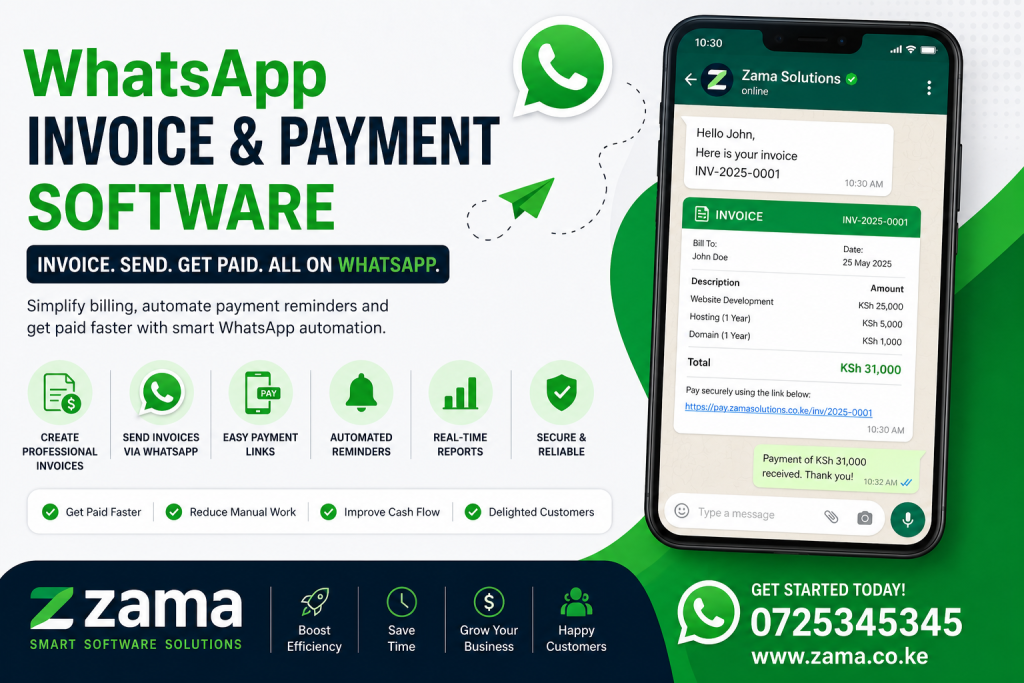
Businesses are constantly looking for faster, easier, and more convenient ways to invoice customers and collect payments. Traditional invoicing methods often involve creating documents, downloading PDF invoices, sending emails, waiting for customers to respond, and manually confirming payments. For businesses handling hundreds or thousands of transactions, these processes can consume valuable time and create unnecessary administrative work.
This is where WhatsApp Invoice and Payment Software can transform business operations.
By combining invoicing, customer communication, payment requests, notifications, and transaction management within a familiar messaging environment, businesses can create a smoother payment experience for their customers. Instead of requiring customers to move between different platforms, businesses can send invoices and payment instructions directly through WhatsApp while maintaining a structured back-office system.
The growing use of digital communication and mobile payments has created new opportunities for businesses across Kenya and other markets. Customers increasingly expect businesses to provide quick responses, convenient payment options, digital receipts, and clear transaction records. Businesses that continue relying entirely on manual invoicing may find it increasingly difficult to meet these expectations.
With WhatsApp Invoice and Payment Software, companies can streamline the invoicing process, improve payment communication, automate reminders, reduce administrative work, and create a more convenient customer experience.
This comprehensive guide explores how WhatsApp-based invoicing and payment software works, its benefits, features, applications, implementation process, challenges, and why it can be an important tool for modern businesses.
What Is WhatsApp Invoice and Payment Software?
WhatsApp Invoice and Payment Software is a digital solution that enables businesses to create, send, manage, and track invoices while communicating with customers through WhatsApp.
Rather than treating invoicing and communication as separate processes, the software connects them into one workflow.
For example, a business can create an invoice for a customer and send the invoice details through WhatsApp. The customer can receive information about the amount due, payment instructions, invoice reference, and due date in a convenient communication channel.
Depending on the system, businesses may also provide payment links or integrated payment options that allow customers to complete transactions without unnecessary delays.
A typical workflow may look like this:
- A customer places an order.
- The business creates an invoice.
- The software generates an invoice reference.
- The invoice is sent to the customer through WhatsApp.
- The customer receives payment instructions or a payment link.
- The customer makes the payment.
- The transaction is recorded.
- A payment confirmation is sent.
- A digital receipt can be generated.
- Automated reminders can be sent if payment remains outstanding.
This process creates a more connected billing experience.
Why Businesses Need WhatsApp-Based Invoicing
Invoicing is essential for nearly every business, but the process is often more complicated than it needs to be.
Businesses may create invoices using spreadsheets, accounting applications, word processors, or standalone invoicing platforms. After creating the invoice, employees may send it by email or manually share it with customers through messaging platforms.
This creates several separate steps.
A customer may also ignore an email notification but respond quickly to a WhatsApp message.
WhatsApp Invoice and Payment Software helps address this communication gap by bringing invoice delivery closer to the channels customers already use.
The objective is not simply to send invoices through WhatsApp. It is to create a complete workflow where invoicing, communication, payment collection, confirmation, and follow-up can work together.
How WhatsApp Invoice and Payment Software Works
A modern WhatsApp Invoice and Payment Software platform typically connects several business functions.
The first component is the invoicing engine.
This allows businesses to create invoices containing details such as:
- Business name
- Customer name
- Invoice number
- Products or services
- Quantities
- Prices
- Taxes
- Discounts
- Total amount
- Due date
- Payment instructions
Once the invoice is generated, the system can communicate it to the customer through WhatsApp.
The customer can then receive the relevant information and proceed with payment.
The software can also update the business system when a payment is received, depending on the payment integration being used.
This creates a connected workflow rather than a collection of disconnected tasks.
Key Features of WhatsApp Invoice and Payment Software
When selecting a platform, businesses should evaluate the features available.
Automated Invoice Generation
The software should make it easy to generate professional invoices quickly.
Businesses should be able to create invoices using predefined templates and automatically populate customer and transaction information.
WhatsApp Invoice Delivery
The ability to send invoices directly to customers through WhatsApp is a major feature.
This reduces the number of steps required to communicate billing information.
Payment Links
A payment link can allow customers to move directly from receiving an invoice to completing payment.
This can reduce friction and improve the overall customer experience.
Payment Status Tracking
Businesses should be able to determine whether an invoice is:
- Draft
- Sent
- Viewed
- Partially paid
- Fully paid
- Overdue
- Cancelled
Clear status tracking helps finance teams understand what requires attention.
Automated Payment Reminders
Following up on unpaid invoices manually can take significant time.
Automated reminders can notify customers when payment is approaching or overdue.
Digital Receipts
After payment, the system can generate a digital receipt and send confirmation to the customer.
Customer Records
The software can maintain customer information, transaction history, invoice history, and payment records.
Reporting and Analytics
Management should be able to monitor invoicing and payment performance through reports and dashboards.
Multiple Payment Options
Depending on the implementation, the platform can support multiple payment methods so customers can use the option that is most convenient for them.
Benefits of WhatsApp Invoice and Payment Software
Businesses can benefit from this technology in several ways.
1. Faster Invoice Delivery
Email invoices can sometimes be delayed, overlooked, or lost among other messages.
Sending invoices through WhatsApp can provide a more immediate communication experience.
2. Improved Payment Communication
Customers can receive invoice information and payment instructions through a familiar communication channel.
3. Reduced Administrative Work
Automation can eliminate repetitive tasks such as manually sending invoices, checking payment status, and sending reminders.
4. Faster Payment Follow-Up
Businesses can identify outstanding invoices and automatically initiate follow-up communication.
5. Better Customer Experience
Customers appreciate simple, convenient payment processes.
6. Improved Record Keeping
Centralized records make it easier to retrieve invoice and payment information.
7. Better Cash Flow Visibility
Management can see outstanding invoices and payments in a more structured way.
8. Reduced Human Error
Automated calculations and workflows can reduce errors caused by manual data entry.
9. Scalable Operations
A digital invoicing workflow can support growing transaction volumes without requiring the same increase in administrative staff.
Improving Cash Flow With WhatsApp Invoice and Payment Software
Cash flow is one of the biggest challenges businesses face.
A company can have significant sales but still experience financial pressure if customers take too long to pay.
Delayed payments affect the ability to:
- Pay suppliers
- Pay employees
- Purchase inventory
- Cover operational expenses
- Invest in growth
- Meet financial obligations
WhatsApp Invoice and Payment Software can support faster payment collection by reducing delays between invoicing and customer action.
When customers receive invoices promptly, understand what they owe, and have convenient payment options, the payment process can become more efficient.
Automated reminders can further reduce the number of invoices that remain unpaid simply because customers forgot the due date.
WhatsApp Invoice and Payment Software for SMEs
Small and medium-sized businesses often operate with limited administrative resources.
The business owner may handle sales, invoicing, customer communication, accounting, and payment follow-up personally.
Manual processes can therefore become overwhelming.
A digital system can help SMEs automate repetitive invoicing activities.
For example, a small consultancy can generate an invoice after completing a project and send it directly to the client through WhatsApp.
A retailer can generate invoices for customer purchases.
A service provider can issue recurring invoices and send reminders.
A wholesaler can invoice customers after processing orders.
These workflows can save time while improving professionalism.
WhatsApp Invoice and Payment Software for Retail Businesses
Retail businesses process many customer transactions.
Depending on the business model, customers may require receipts, invoices, payment confirmations, or order details.
Integrating invoicing with WhatsApp can improve customer communication after a sale.
For example, after purchasing goods, a customer can receive:
- Order confirmation
- Invoice
- Payment confirmation
- Receipt
- Delivery information
- Customer support instructions
This creates a complete digital customer journey.
WhatsApp Invoice and Payment Software for Service Businesses
Service businesses often invoice customers after delivering work.
Examples include:
- Consulting firms
- Marketing agencies
- IT companies
- Repair companies
- Cleaning companies
- Accounting firms
- Legal services
- Construction contractors
- Freelancers
- Professional service providers
A service provider can create an invoice and send it directly to the customer.
This reduces reliance on manual email follow-ups.
WhatsApp Invoice and Payment Software for Property Management
Property managers deal with recurring financial transactions.
They may need to send tenants:
- Rent invoices
- Payment reminders
- Outstanding balance notifications
- Receipts
- Statements
- Maintenance charges
- Other property-related invoices
Using WhatsApp Invoice and Payment Software can help property managers create a more consistent billing and communication process.
A tenant can receive a notification about rent due, access payment instructions, make the payment, and receive confirmation.
For property managers handling many tenants, this can significantly reduce administrative work.
WhatsApp Invoice and Payment Software for Schools
Educational institutions manage various types of payments.
These can include:
- Tuition
- Registration
- Transport
- Meals
- Accommodation
- Activities
- Examination fees
- Other school charges
Instead of relying exclusively on printed invoices and manual payment communication, schools can use digital messaging to notify parents and students about outstanding balances.
Automated payment reminders can help improve collection efficiency while giving parents clearer information about what they owe.
WhatsApp Invoice and Payment Software for Healthcare
Healthcare providers can use digital invoicing and payment communication to simplify patient billing.
A patient may receive information about:
- Consultation charges
- Laboratory services
- Medication
- Procedures
- Outstanding balances
- Payment confirmations
Digital communication can make billing more convenient while helping healthcare organizations maintain better records.
Sensitive information should, of course, be handled with appropriate privacy and security controls.
WhatsApp Invoice and Payment Software for Logistics Companies
Logistics businesses manage transactions between customers, suppliers, drivers, and other stakeholders.
They can use digital invoicing workflows for:
- Delivery charges
- Freight services
- Transportation
- Storage
- Handling fees
- Additional services
A customer can receive an invoice after a shipment is processed and receive payment instructions through WhatsApp.
This can improve communication between logistics providers and customers.
WhatsApp Invoice and Payment Software for E-Commerce
Online businesses need efficient systems for managing orders, invoices, and payments.
An e-commerce platform can connect its order management system to an invoicing and WhatsApp communication system.
After an order is placed, the customer can receive:
- Order confirmation
- Invoice
- Payment request
- Payment confirmation
- Delivery notification
This reduces uncertainty and keeps customers informed throughout the transaction.
Automated Payment Reminders
One of the most valuable capabilities of WhatsApp Invoice and Payment Software is automated follow-up.
Many unpaid invoices are not necessarily the result of unwillingness to pay. Customers may simply forget.
A reminder can be sent before the due date.
Another reminder can be sent when payment becomes overdue.
A final reminder can be sent after a specified period.
The business can define different communication rules based on its payment policies.
Automation ensures that reminders are consistent without requiring employees to manually contact every customer.
Recurring Invoices
Some businesses charge customers on a recurring basis.
Examples include:
- Subscriptions
- Monthly services
- Property rent
- Maintenance contracts
- Internet services
- Professional retainers
- Memberships
A recurring invoicing system can automatically generate invoices according to predefined schedules.
Customers can then receive notifications through WhatsApp.
This can make recurring billing more predictable and reduce manual work.
Payment Confirmation and Digital Receipts
After customers make payments, they want confirmation that the transaction has been received.
A digital receipt can provide reassurance and improve the customer experience.
The system can send a confirmation containing:
- Payment reference
- Invoice number
- Amount paid
- Date
- Customer information
- Remaining balance, where applicable
This reduces the need for customers to contact the business asking whether their payment was received.
Managing Partial Payments
Not every customer pays an invoice in full.
Businesses may allow installment payments or partial settlement.
A good WhatsApp Invoice and Payment Software solution should be capable of recording partial payments and calculating remaining balances.
For example, if a customer pays part of an invoice, the system should update the account and show the amount still outstanding.
This helps finance teams maintain accurate records.
Improving Customer Experience
Payment processes can influence how customers perceive a business.
A complicated payment experience can create frustration.
Customers may have to:
- Search through emails
- Download attachments
- Copy payment information
- Contact customer support
- Send proof of payment
- Wait for confirmation
A streamlined digital workflow can reduce these steps.
By communicating through WhatsApp and providing convenient payment instructions, businesses can create a smoother experience.
Integrating WhatsApp With Business Systems
The greatest value comes when WhatsApp is connected to existing business systems.
For example, a business might integrate:
- CRM software
- Accounting software
- ERP
- E-commerce platform
- Inventory system
- Payment gateway
- Customer database
- Help desk
- Order management platform
When these systems communicate with one another, invoicing and payments can become part of a broader automated workflow.
Accounting Integration
Accounting systems contain critical financial information.
Integrating invoicing software with accounting platforms can reduce duplicate data entry.
When an invoice is created, the information can potentially be synchronized with the accounting system.
When payment is received, the financial record can be updated.
This creates better consistency between customer communication and financial records.
Payment Gateway Integration
Payment gateway integration allows customers to move from receiving an invoice to completing a payment.
Depending on the business and location, a solution can be designed to support relevant digital payment methods.
The exact payment options should be selected based on customer preferences, transaction requirements, security considerations, and available integrations.
Security Considerations
Any system that handles customer information and payment-related data must take security seriously.
Businesses should consider:
- User authentication
- Role-based permissions
- Secure APIs
- Data encryption
- Access controls
- Audit logs
- Secure payment processing
- Data backups
- Monitoring
- Incident response
WhatsApp communication should also be implemented according to applicable platform rules and business requirements.
A professional software development team should incorporate security into the system architecture from the beginning.
Data Privacy and Compliance
Businesses should also consider applicable data protection requirements.
Customer information may include names, phone numbers, transaction histories, addresses, and financial information.
Organizations should collect only the information they need and protect it appropriately.
A good implementation should include:
- Appropriate access controls
- Secure storage
- Clear data retention policies
- Responsible data processing
- User permissions
- Audit mechanisms
How to Implement WhatsApp Invoice and Payment Software
Successful implementation requires careful planning.
Step 1: Identify Business Requirements
Start by identifying current invoicing and payment challenges.
Ask:
- How are invoices currently generated?
- How are they delivered?
- How are payments tracked?
- How are customers reminded?
- How are receipts generated?
- Where are financial records stored?
Step 2: Map Existing Workflows
Document the current process from customer order to final payment.
This helps identify unnecessary manual steps.
Step 3: Define Automation Opportunities
Determine which tasks can be automated.
These might include invoice generation, delivery, reminders, payment confirmation, and receipt generation.
Step 4: Choose Integrations
Determine which existing systems need to connect to the new platform.
Step 5: Design the Customer Experience
The customer should receive clear, concise, and useful messages.
Avoid overwhelming customers with complicated instructions.
Step 6: Test the System
Before launching, test different payment scenarios, including:
- Successful payments
- Failed payments
- Partial payments
- Overdue invoices
- Duplicate transactions
- Refunds
- Cancellations
Step 7: Train Staff
Employees should understand how to monitor invoices, payments, customer conversations, and exceptions.
Step 8: Launch and Monitor
After implementation, monitor performance and identify opportunities for improvement.
Common Challenges
Despite its benefits, businesses should understand the challenges involved.
Customer Data Quality
Incorrect phone numbers can prevent messages from reaching customers.
Integration Complexity
Connecting several systems can require technical expertise.
Customer Adoption
Some customers may still prefer traditional communication channels.
Payment Failures
Businesses should establish procedures for handling unsuccessful transactions.
Message Management
Automated communication should be carefully designed to avoid excessive messaging.
Security
Payment-related workflows require strong security controls.
How to Choose the Right Software
When evaluating WhatsApp Invoice and Payment Software, businesses should consider more than the ability to send invoices.
Look for a platform that provides:
- Automated invoice generation
- WhatsApp integration
- Payment integration
- Customer management
- Automated reminders
- Digital receipts
- Payment tracking
- Partial payment support
- Reporting
- Accounting integration
- API support
- Security features
- Scalability
- Customer support
The system should be flexible enough to support your current operations and future growth.
Measuring the Success of WhatsApp Invoicing
Businesses should establish measurable objectives before implementation.
Possible metrics include:
- Invoice delivery rate
- Invoice viewing rate
- Payment completion rate
- Average payment time
- Overdue invoice percentage
- Collection rate
- Administrative hours saved
- Customer response rate
- Customer satisfaction
- Payment reconciliation accuracy
These metrics can help management determine whether the system is producing meaningful business value.
The Future of Digital Invoicing and Payments
The future of invoicing is increasingly connected to automation, messaging, digital payments, artificial intelligence, and real-time data.
Businesses will increasingly expect systems to automatically:
- Create invoices
- Send invoices
- Answer customer questions
- Provide payment links
- Send reminders
- Confirm transactions
- Generate receipts
- Update accounting records
- Produce reports
Artificial intelligence may further improve these workflows by helping businesses answer invoice questions, identify unusual payment patterns, summarize customer accounts, and assist finance teams.
However, automation should always be implemented responsibly and with appropriate controls.
Why Businesses Should Consider WhatsApp Invoice and Payment Software
Businesses compete not only on products and prices but also on convenience.
Customers want fast communication and simple transactions.
A customer who receives an invoice quickly and can pay through a convenient channel may be more likely to complete the transaction promptly.
WhatsApp Invoice and Payment Software brings these capabilities closer together.
It can reduce administrative work, improve payment communication, simplify follow-up, and provide businesses with more organized transaction records.
The technology can be particularly useful for organizations handling recurring invoices, large customer databases, high transaction volumes, or frequent payment reminders.
Frequently Asked Questions
What is WhatsApp Invoice and Payment Software?
It is a digital solution that enables businesses to generate invoices, send invoice information through WhatsApp, communicate payment instructions, track payment status, send reminders, and provide transaction confirmations.
Can businesses send invoices automatically through WhatsApp?
Yes. Depending on the platform and WhatsApp integration, businesses can automate invoice notifications and other customer communications.
Can customers pay directly after receiving an invoice?
A system can be designed to provide payment links or payment instructions through the WhatsApp conversation. The available payment methods depend on the integrations implemented.
Can the software send payment reminders?
Yes. Automated reminders can be configured based on invoice due dates and payment status.
Can businesses generate receipts?
Yes. Digital receipts can be generated after successful transactions and shared with customers.
Is WhatsApp invoicing suitable for small businesses?
Yes. Small businesses can benefit from automated invoicing, payment tracking, reminders, and customer communication.
Can the system handle recurring invoices?
Yes. Recurring billing workflows can be designed for subscriptions, rent, memberships, retainers, and other repeat charges.
Can WhatsApp invoicing integrate with accounting software?
Yes. Through APIs and other integrations, invoicing systems can be connected to accounting and financial platforms.
Is WhatsApp Invoice and Payment Software secure?
Security depends on how the system is designed and implemented. Businesses should use appropriate authentication, access controls, secure integrations, encryption, and payment security practices.
Can the system handle multiple customers?
Yes. A properly designed system can manage large customer databases and high volumes of invoices and transactions.
The way businesses invoice and collect payments is changing rapidly. Customers increasingly expect digital communication, convenient payment options, quick confirmations, and simple transaction experiences.
For businesses looking to modernize their billing operations, WhatsApp Invoice and Payment Software offers a practical way to combine invoicing, customer communication, payment collection, reminders, and transaction tracking.
Instead of generating an invoice in one system, sending it through another channel, manually checking payment records, and contacting customers separately, businesses can create a connected workflow.
WhatsApp Invoice and Payment Software can help businesses reduce administrative workloads by automating repetitive invoicing and payment communication tasks.
It can also help businesses improve customer experiences by providing information through a familiar communication channel.
For SMEs, WhatsApp Invoice and Payment Software can provide an affordable and scalable way to professionalize billing and payment follow-up.
For larger organizations, WhatsApp Invoice and Payment Software can support high-volume transaction management, system integration, automation, and centralized reporting.
For service providers, WhatsApp Invoice and Payment Software can simplify project billing and recurring customer payments.
For property managers, WhatsApp Invoice and Payment Software can streamline rent invoices, reminders, statements, and payment confirmations.
For retailers and e-commerce businesses, WhatsApp Invoice and Payment Software can connect orders, invoices, payment requests, and customer notifications into a single workflow.
The real value of WhatsApp Invoice and Payment Software is not simply sending invoices through WhatsApp. Its value comes from connecting communication with business processes.
When properly integrated, WhatsApp Invoice and Payment Software can help businesses reduce delays between invoicing and payment.
Automated reminders can make it easier to follow up on outstanding invoices without requiring employees to manually contact every customer.
Payment confirmation can also become faster, helping customers know that their transactions have been successfully received.
Another important benefit of WhatsApp Invoice and Payment Software is improved visibility. Management can monitor invoices, outstanding balances, payments, and collection performance through centralized dashboards and reports.
This information can support better financial decision-making.
Businesses can identify customers with overdue balances, understand payment trends, measure collection performance, and identify bottlenecks in the invoicing process.
As businesses grow, the importance of automation increases. A company processing 20 invoices a month may be able to manage manually. A business processing thousands of invoices needs a more scalable approach.
WhatsApp Invoice and Payment Software can provide the infrastructure needed to support that growth.
The technology can also improve professionalism. A consistent digital invoice, payment notification, reminder, and receipt workflow gives customers a more organized experience.
However, businesses should select their technology carefully.
The best WhatsApp Invoice and Payment Software should integrate with existing systems, provide appropriate security controls, support reliable payment workflows, and allow businesses to customize communication according to their needs.
Companies should also consider scalability.
A solution that works for a small business today should ideally be capable of supporting more customers, transactions, employees, and integrations as the company grows.
Another important consideration is customer experience.
Businesses should avoid creating overly complicated WhatsApp messages or sending too many notifications. Communication should be clear, useful, timely, and relevant.
Ultimately, WhatsApp Invoice and Payment Software represents a shift toward more connected business operations.
Instead of treating invoicing, communication, and payments as separate activities, businesses can bring them together into one streamlined digital workflow.
For companies seeking to improve cash flow, reduce manual work, strengthen customer relationships, and modernize their financial operations, WhatsApp Invoice and Payment Software can be an important technology investment.
The future of business payments is increasingly digital, automated, and customer-focused. Businesses that adopt smart invoicing and payment workflows can position themselves to operate more efficiently while delivering better experiences.
If your business is still relying on spreadsheets, manual invoices, email-only billing, and repetitive payment follow-ups, it may be time to consider a more connected approach.
A properly implemented WhatsApp Invoice and Payment Software solution can help turn invoicing from an administrative burden into a streamlined business process.
By combining automation, WhatsApp communication, payment integration, digital receipts, reporting, and customer management, WhatsApp Invoice and Payment Software can provide businesses with a smarter way to manage their billing operations.
The goal is simple: make it easier for businesses to invoice customers, easier for customers to understand what they owe, and easier for everyone to complete and confirm payments.
WhatsApp Invoice and Payment Software is therefore more than an invoicing tool. It can become an important component of a broader digital transformation strategy that helps businesses operate faster, communicate better, and manage cash flow more effectively.
If your organization wants to automate invoicing, simplify payment collection, improve customer communication, and build a more efficient digital payment workflow, now is the right time to explore how WhatsApp Invoice and Payment Software can fit into your operations.